Deploy your code
Questions
- How to make your program work for others?
Learning outcomes of 'Deployment'
- I can mentalize the installation needs from the users' perspective
- I can initialize a new project
Content
- We will prepare for user installation of our code
- But also...
- some theory of packages
- some theory of containers
Instructor notes
Prerequisites are:
- Package
Lesson Plan:
- Total 40 min
- Theory 15
- Start by not showing screen
- ask questions
- Exercises 25 min
Introduction
Note
- Many projects/scripts start as something for personal use, but expands to be distributed.
- Let's start in that end and be prepared.
Tip
- Make your program or workflow work for others and yourself in the future.
Discussion: What is deployment?
Software deployment is all of the activities that make a software system available for use. Wikipedia
- Producer side: Prepare so user can install and use
- User side: Install after instructions
Discussion: What to think about as developer?
- package dependencies (Python, R etcetera)
- libraries (compiled languages like C C++ Fortran)
- OS Platforms
- system libraries
- shared service
Discussion: Reproducibility?
We can control our code but how can we control dependencies?
Discussion: 10-year challenge?
Try to build/run your own code that you have created 10 (or less) years ago. Will your code from today work in 5 years if you don’t change it?
Discussion: Dependency hell
Different codes in the same environment can have conflicting dependencies.
To make sure about needed dependencies
-
2 levels of dependencies
- packages
- system libraries
System libraries
- Nowadays platforms are less important, still "system files" may differ among OS platforms and Linux distributions
- will your program require specific "system files"
- are these typically not installed already?
- in the best world test on Windows/Mac and Linux platforms
Shared services like HPC clusters
- What about Shared services like a cluster where users and most staff do not have writing privileges ('sudo' rights) for system installations?
Discussion: Where do you run your program?
- From a terminal?
- Linux, Mac, Windows?
- From IDE?
- VSCode, RStudio, MATLAB, Jupyter, Spyder, Idle
- On different computers
- Using several platforms
- On a cluster?
- NAISS resources, other?
We need to
- Inform what is needed to run the software in the README file (Next session)
- Or provide them with everything needed (file)
- hopefully not interfering with other software they are using
Distribution
Ways to distribute
- Python packages:
- pip (PyPI)
- conda packages and environments
- also:
uv,pixi,poetry
- R:
- R repos like CRAN and GitHub (devtools)
- conda
- Compiled languages:
- built binaries (platform specific)
- install from source
- manual
- make
- CMake
- General tools
- Containers
Isolated environments
Discussion: What is an isolated environment?
These solve both the identification of needed dependencies and help in installations.
Principles to define dependencies needed
- Work in an isolated environment
- Start with empty environment
- See what is needed for the program to work?
- Add the missing packages or libraries until the errors go away
- save the environment variables in a file.
Best is to do this already in the beginning!
When is this over-kill?
- If the needed dependencies are few and well-defined
- Some programming languages?
Python: Conda & virtual environments
These Python-related tools try to solve the following problems:
- Defining a specific set of dependencies, possibly with well-defined versions
- Definition file:
requirements.txt,environment.yml - Installing those dependencies mostly automatically
- Recording the versions for all dependencies
- Isolated environments
- On your computer for projects so they can use different software.
- Isolate environments on computers with many users (and allow self-installations)
- Using different Python/R versions per project??
- Provide tools and services to share packages
Principle using python pip in a virtual environment (venv)
- Let's focus here on PyPI!
- Remember we made a package this morning!
-
We'll briefly cover the other tools after the exercise.
-
We can make other users aware of the dependencies for our Python project.
- One can state those specifically as a list in a README
- Or, we can make a ready file (in python)
Save your requirements as a file
- You may have developed your Python program with your existing python modules environment. You may have installed some new packages during the development but did not track it in a good way.
- We need to identify what python packages a user (or you on another computer) will need, to make the program work!
- There are many packages distributed in the "base" installation of Python so it is not just to look at the import lines in the code.
- You may also be hard to get an overview because you have too many import lines, also distributed among files if you worked in a modular way
Example
Demo with planet
    git switch -c venv
    python -m venv venv
    source venv/Scripts/activate # Mac/Linux has venv/bin/activate
    pip freeze  #should be empty
    ls
    cd code
    ls
    python planet_main.py
        import numpy as np
        ModuleNotFoundError: No module named 'numpy'

    pip install numpy
    python planet_main.py
        ModuleNotFoundError: No module named 'matplotlib'
    pip install matplotlib
    pip freeze
    pip freeze > requirements.txt
    deactivate # deactivate the virtual environment

    git add requirements.txt
    git commit -m "add requirements.txt"
    git push
    git switch main
    git merge venv
    git push
Ignoring files and paths with .gitignore
Compiled and generated files are not committed to version control.
Here are some reasons
- Your code could be run on different platforms.
- These files are automatically generated and thus do not contribute in any meaningful way.
- The number of changes to track per source code change can increase quickly.
- When tracking generated files you could see differences in the code although you haven't touched the code.
For this we use a .gitignore file (put in root folder)
(optional) Exercise 1: Identify lacking packages (15-20 min)
? tip (If running this in class)
- Work individually locally (in VS Code)
- Help each-other if getting stuck
- 2-3 per group
Step 1: Start an EMPTY python virtual environment
- Git pull!
- Go to the dir
learners/<your-name>locally - Check that you can run python from the commandline!
Don't find it?
- If not found, and you have installed Conda/miniconda, "source activate Conda"
Examples, please try to find your solution from these or combination of these.
- Test
which pythonagain!
- Create a virtual environment, called
usertest
- This creates an empty virtual environment located in
usertestdirectory - Activate
- Note the
(usertest)in the beginning of the prompt! Could be together with the conda(base)environment as well. - Check versions
which python     # must point to the python belonging to the virtual environment
python -V        # note this version (same as you started the virtual environment from)
which pip        # must point to the pip belonging to the virtual environment
- Check it is empty with the command
pip list - It should just show
- and some notes.
Step 2: Run the analysis.py script in /example and look for missing packages
- Go to the
/exampledirectory whereanalysis.pyis - Run the program
- It may give you errors of missing packages
- Install it with
How do I install packages in virtual environments
- Do NOT use
--user, since it should be installed in the virtual environment only.
how to install uppsalaweather
(note the blank space before the package name!
-
Test run the program again
-
If more packages are needed, errors will still show up
-
Do pip installations until your program works!
-
Otherwise continue to next step
Step 3: Save your requirements as a file that user can run to get the needed dependencies
- Check what is installed by:
- You will probably recognise some of them, but some may be more obscure and were installed automatically as dependencies.
- Save your requirements as a file in your learners folder.
-
Other users can then install the same packages with:
-
End the isolated environment
- Push the changes
(Optional) Step 4: Test the requirements file in a new environment
-
Double-check it works by:
-
Create another virtual environment
- Activate
- Note the
(usertest2)in the beginning of the prompt!
- Run the program!
No errors should show up!
(Optional) Step 5: Add the folder to .gitignore
- Add test directory to
.gitignorefile (root folder in repository)
Push changes
- Git push!
- You should all have a requirements file in your folder
Follow up
Requirements file enabling test packages to be found
--index-url https://test.pypi.org/simple/
--extra-index-url https://pypi.org/simple
--pre
uppsalaweather==0.9
- possibly not all of the 3 upper lines are needed
(One person): Move a working requirements file to the learners folder
- Move the requirements file to the
learners/sourcefolder - This will be the "official" requirements file
- That person git commit and pushes to GitHub!
Going further with deployment
Python for scientific computing
Course advertisement
Possibilities for other languages can be
Compiled language, course
Containers
-
Containers let you install programs without needing to think about the computer environment, like
- operative system
- dependencies (libraries and other programs) with correct versions
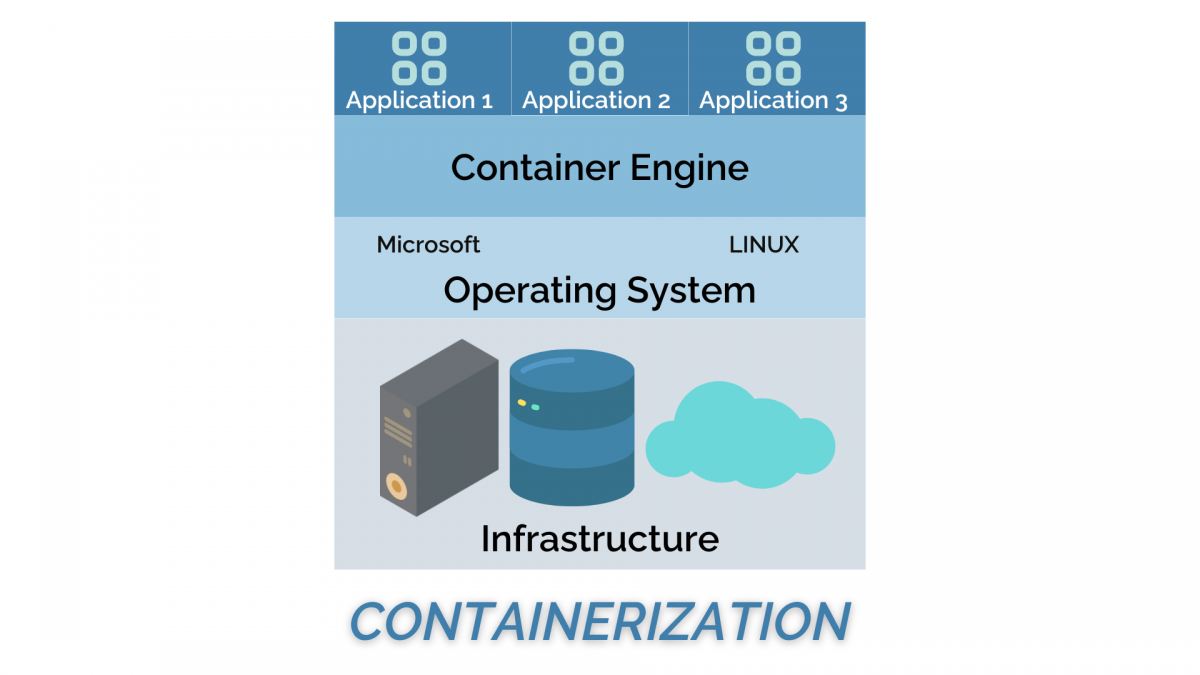
From Nextlabs:
Info
-
2(3) types
- Singularity/Apptainer perfect for HPC systems
-
Docker that does not work on HPC-systems
- But docker images can be used by Singularity and Apptainer
-
Everything is included
-
Workflow:
- Download on Rackham or local computer
- Transfer to Bianca
- Move to from wharf to any place in your working folders on Bianca
-
Draw-backs
- you install also things that may be already installed
- therefore, probably more disk space is needed
Quality of life
-
Run a python script without the
pythonbefore in a linux environment! -
This line helps in the top of the main script:
-
Then the python active in "PATH" will automatically be used
- especially important on a shared system where python is not in the typical
/usr/bin/pythonpath.
- especially important on a shared system where python is not in the typical
-
Run from command line as:
Summary
Key points
Make sure it works for others or yourself in the future!
Parts to be covered!
- ☑ Source/version control
- Git
- GitHub as remote backup
- inititalize from existing project
- branches
- ☑ Planning
- ☑ Analysis
- ☑ Design
- ☑ Testing
- Different levels
- ☑ Collaboration
- GitHub
- pull requests
- ☐ Sharing
- ☑ open science
- ☐ citation
- ☐ licensing
- ☑ deploying
- ☐ Documentation
- ☑ in-code documentation
- ☐ finish documentation