Social coding
Learning outcomes of 'Social coding'
Learners
- have an overview of motivations, benefits, but also risks of sharing and reusing code.
- How to start a git repo from existing code project?
Instructor notes
Prerequisites are:
- Git
Lesson Plan:
- Total 45 min
- Social coding 25
- Start by not showing screen
- ask questions
- Briefly on licenses
- Repo initialization
- Principles 5m
- Exercises 15 min
Note
- This material is based on the Social Coding lecture by Code Refinery:
-
Social coding by CodeRefinery is licensed under CC BY 4.0.
-
The Open Science movement encourages researchers to share research output beyond the contents of a published academic article (and possibly supplementary information).
- Open-source license is a type of license for computer software and other products that allows the source code, blueprint or design to be used, modified and/or shared under defined terms and conditions.
FAIR
The current buzzword for data management
-
You may be asked about it in, for example, making data management plans for grants:
-
Findable
- Will anyone else know that your data exists?
- Solutions: put it in a standard repository, or at least a description of the data. Get a digital object identifier (DOI).
- Accessible
- Once someone knows that the data exists, can they get it?
- Usually solved by being in a repository, but for non-open data, may require more procedures.
- Inter-operable
- Is your data in a format that can be used by others, like csv instead of PDF?
- Or better than csv. Example: 5-star open data
- Reusable
- Is there a license allowing others to re-use?
Opening discussions
Info
Choose one or several!
1: Why would I want to share my scripts/code/data?
- A: Easier to find and reproduce (scientific reproducibility)
- B: More trustworthy: others can verify correctness and find and report bugs
- C: Enables others to build on top of your code (derivative work, provided the license allows it)
- D: Others can submit features/improvements
- E: Others can help fixing bugs
- F: Many tools and apps are free for open source, so no financial cost for this (GitHub, GitLab, Appveyor, Read the Docs)
- G: Good for your CV: you can show what you have built
- H: Discourages competitors. If others can't build on your work, they will make competing work
- I: When publicly shared, usually we timestamp or set a version, so it is easier to refer to a specific version
- J: You can reuse your own code later after change of job or affiliation
- K: It encourages me to code properly from the start
2: The most concerning thing for me, If I share my software now
- A: It will be scooped (stolen) by someone else
- B: It will expose my "ugly code"
- C: Others may find bugs and mistakes. What if the algorithm is wrong?
- D: I will get too many questions, I do not have time for that
- E: Losing control over the direction of the project
- F: Low quality copies will appear
- G: I won't be able to sell this later. Someone else will make money from it
- H: It is too early, I am just prototyping, I will write version to distribute later
- I: Worried about licensing and legal matters, as they are very complicated
Sharing code and Citation
Citation as one form of academic credit to motivate sharing papers.
Sharing papers and academic credit:
- The goal is maximum visibility and maximum reuse.
- The more interesting science is done referencing my paper, the better for me.
- Nobody actively tries to limit the reach of their papers.
Different ways we can benefit from sharing code.
Sharing code:
- "I did all the ground work and they get to do the interesting science?"
- Sharing code and encouraging derivative work may boost your academic impact.
- But will your work be visible if it is used two levels deep down?
Journal policies as motivation for sharing
From Science editorial policy
"We require that all computer code used for modeling and/or data analysis that is not commercially available be deposited in a publicly accessible repository upon publication. In rare exceptional cases where security concerns or competing commercial interests pose a conflict, code-sharing arrangements that still facilitate reproduction of the work should be discussed with your Editor no later than the revision stage."
From Nature editorial policy
"An inherent principle of publication is that others should be able to replicate and build upon the authors' published claims. A condition of publication in a Nature Research journal is that authors are required to make materials, data, code, and associated protocols promptly available to readers without undue qualifications. Any restrictions on the availability of materials or information must be disclosed to the editors at the time of submission. Any restrictions must also be disclosed in the submitted manuscript."
However a study showed that despite these policies, many people still do not share their code 😞.
Motivation for open source software
- Enable derivative work
- Do not lock yourself out of own code
- Attract developers who want to be able to show the coding work on their CVs
- Tightly regulated domains require open source
- Open-source software (OSS) can lead to more engagement from industry which may lead to more impact
- If it's not open, it is not likely to become standard
Sharing software is also scary. Why? (And solutions)
- Fear of being scooped
A license can avoid it, and you can release when you are ready. Anyway, it is very unlikely that others will understand your code and publish before you without involving you in a collaboration. Sharing is a form of publishing.
- Exposes possibly "ugly code"
In practice almost nobody will judge the quality of your code. "Software, once written, is never really finished" (N. Asparouhova).
- Others may find bugs and mistakes
Isn't this good? Would you not like to use a code which gives people the chance to locate bugs? If you don't release, people will assume there are bugs anyway.
- Others may require support and ask too many questions
This can become a problem: use tools and community and protect your time. You aren't required to support anyone. You can also "archive" a repository to disable most forms of interaction (issues, PRs). Also a note in README on support level helps.
- Fear of losing control over the direction of the project
Open source does not mean everybody can change your version.
- "Bad" derivative projects may appear
It will be clear which is the official version.
Code reusability
Should you reuse things that others have done?
Types of things that can be reused:
- Main libraries (e.g. NumPy, SciPy)
- Special scientific libraries
- Random code from website
- Copying from Stack Overflow
Do you want others to reuse what you make?
Sharing or not sharing?
Whether and what we can share depends on how we obtained the components.
- Our work depends on outputs from others. Research of others depends on our outputs.
- Whether you can share your output depends on how you obtained your input.
- A repository that is private today might become public one day.
- Sometimes "OTHERS" are you yourself in the future in a different group/job.
- Software licenses matter. And this is what we will discuss the last day.
Sharing data
https://coderefinery.github.io/social-coding/sharing-data/
The Turing Way
- The Turing Way is an open science, open collaboration, and community-driven project.
- We involve and support a diverse community of contributors to make data science accessible, comprehensible and effective for everyone.
- Our goal is to provide all the information that researchers, data scientists, software engineers, policymakers, and other practitioners in academia, industry, government and the public sector need to ensure that the projects they work on are easy to reproduce and reuse.
- The Turing Way Handbook
Licenses
- Copyright: Protects creative expression:
- software,
- writing,
- graphics,
- photos,
- certain data sets,
- this presentation.
- Practically “forever” (lifetime of author + 70 years).
- Derivative work: Sampling/remixing
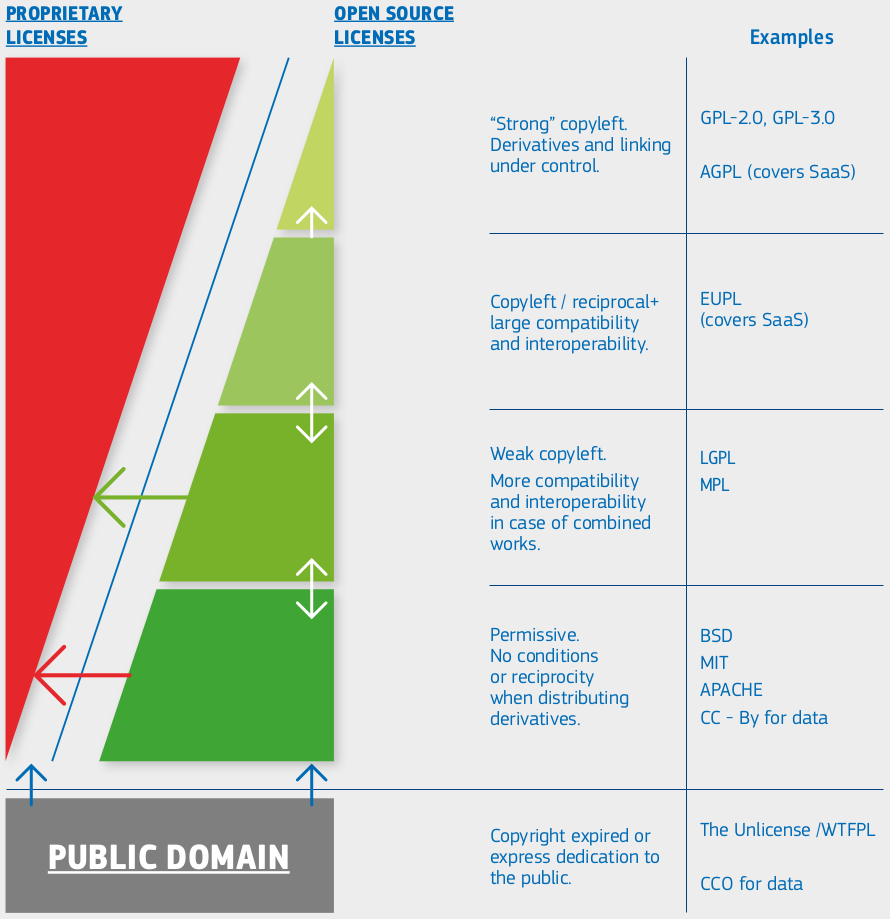
European Commission, Directorate-General for Informatics, Schmitz, P., European Union Public Licence (EUPL): guidelines July 2021, Publications Office, 2021, https://data.europa.eu/doi/10.2799/77160
Comments on the taxonomy:
- Arrows represent compatibility (A -> B: B can reuse A)
- Proprietary/custom: Derivative work typically not possible (no arrow goes from proprietary to open)
- Permissive: Derivative work does not have to be shared
- Copyleft/reciprocal: Derivative work must be made available under the same license terms
- NC (non-commercial) and ND (non-derivative) exist for data licenses but not really for software licenses
When to add license?
- Early (more complicated to change it later when already public)
- Work as if it was public for beginning!
How to choose license?
- Your code is derivative work if you have started from an existing code and made changes to it or if you incorporated an existing code into your code.
- If your code is derivative work, then you need to check the license of the original code.
- From "scratch"
- Does your work contract, grant, or collaboration agreement dictate a specific license?
- Is there an intent to commercialize the code?
- When there is unknown or mixed ownership: If there are multiple persons or organizations as owners of the code, all must agree to the license.
Want to learn more?
Our project
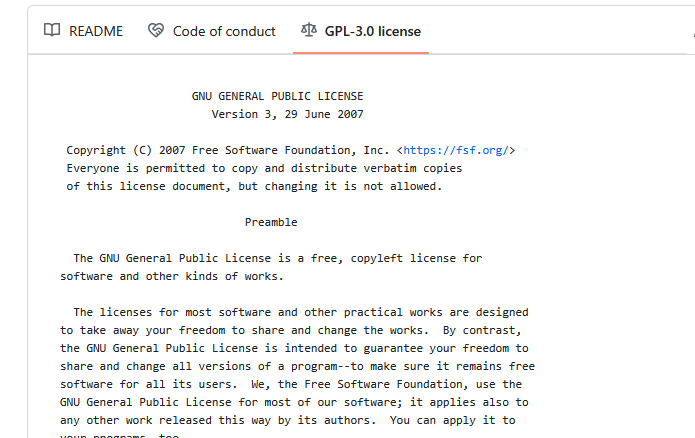
- We use GPL-3 in the project
Strong copyleft share-alike (GPL, AGPL) Derivative work is free software and derivative work extends to the combined project If the licenses of components are strong copyleft, one must use the same license
-
We can click on the license and a image will also show up!
How does that look like?
Start a Git/GitHub repo from personal existing project
- Many projects/scripts start as something for personal use, but expands to be distributed.
- Let's start in that end and be prepared!
Principle
- Initiate git project
- Browse to right root directory (the folder containing all the project-related files)
- Stage and commit
- upload to github
(Optional) Exercise 2: 10-15 minutes
- Let's say you have some code you have started to work with
Tip
- Work individually locally (in VS Code or terminal)
- Help each-other if getting stuck
- Start with 1A OR 1B
- 1a goes to Breakout room 1
- 1b goes to Breakout room 2
Exercise 1A: Identify existing project
- Just use an existing programming project you already have
- Browse to right root directory (the folder containing all the project-related files)
Exercise 1B: Make a code base for a new test project
- Make a
test_projectdirectory in a good place (like a localProgramming formalismscourse folder)
Exercise 2: Initiate the project
VS CODE
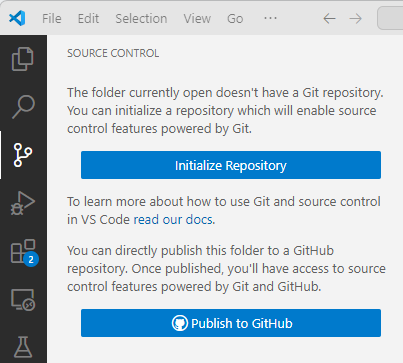
-
RECOMMENDED Publish to GitHub diectly and you are done!
- You may change the name of the repo for the GitHub instance, but not recommended.
- Include the file(s) (in this case the hello.py file) in the repo!
- Double check it was created on GitHub!
- It should show up under repos in your user space
-
ALTERNATIVE: Initialize and then continue with step 3.
Terminal
- Be in a terminal and go to the
projectfolder, which will be the project repository (repo) - run
git init -
make sure that there is a
.gitdirectory created- you have to show hidden files, in bash terminal with
ls -a
- you have to show hidden files, in bash terminal with
-
Now you have a git repo called
test_project - Check with the command:
git status- It is always a safe command to run and in general a good idea to do when you are trying to figure out what to do next.
(If needed) Exercise 3: Add and commit the content
- So far, there is no content. We have to manually add the content to the repo.
- Add and Commit your changes
VS Code
We do this all the time! :)
(If needed) Exercise 4: Upload to GitHub
In VS Code
- There is an opportunity to directly publish on GitHub
From GitHub
- Make sure that you are logged into GitHub.
- You can use this for both VS Code and terminal
-
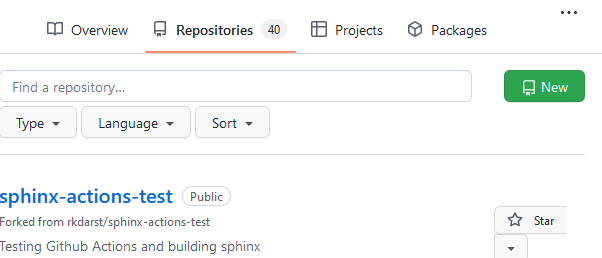
To create a repository we either click the green button "New" (top right corner).
-
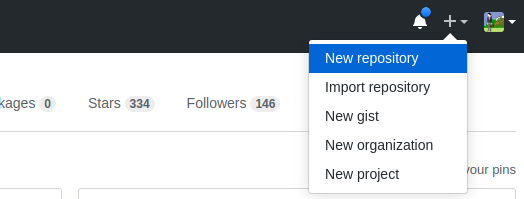
Or if you see your profile page, there is a "+" menu (top right corner).
-
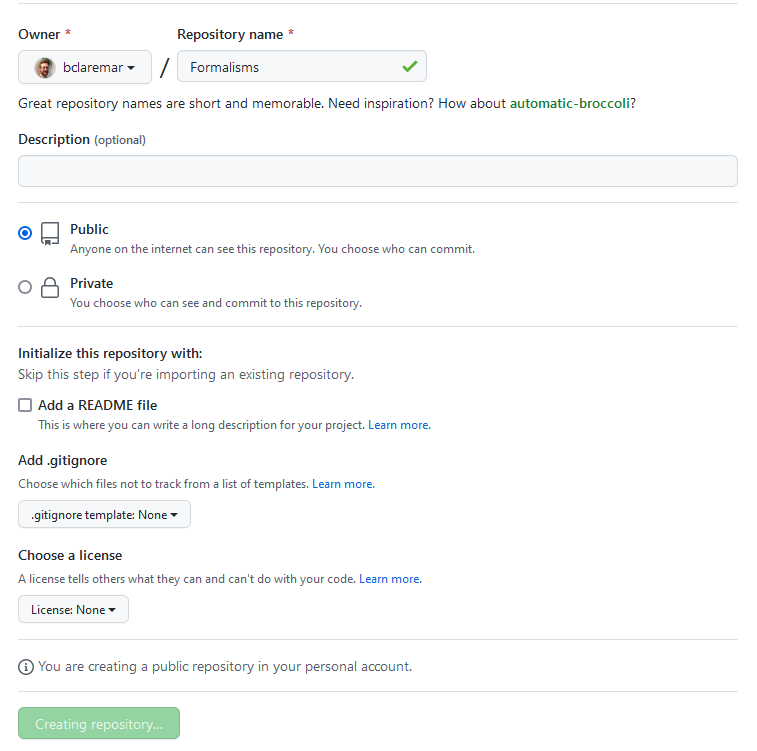
On this page choose a project name, e.g.
test_projector a project name suiting your existing project. -
NOTE It is not necessary to have the same name but it makes things easier to know what is what when syncing between GitHub and git.
-
For the sake of this exercise do NOT select "Initialize this repository with a README"
- and NO Licence
Example project
- Press "Create repository"
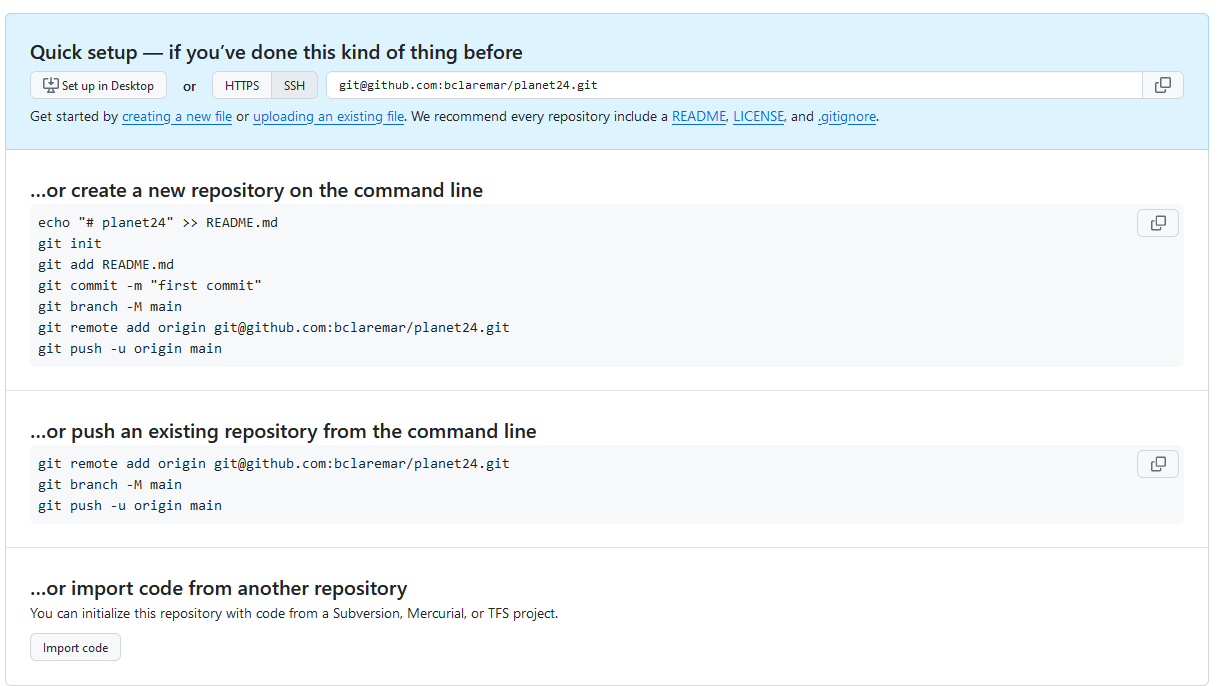
- Choose html
- Copy-paste the code for "…or push an existing repository from the command line"
- Go to local git terminal and go to the git project you started above
-
Paste the code
-
Did it work??
- Reload the GitHub page and see the files present locally is also present there.
Done!
What we did
Workflow
graph TB

P["Project idea"] -->|git init| Node2
P["Project idea"] --> hello.py -->|git add| Node4
Node4 --> |git commit| Node1
Node2 --> |git push| Node5

%% C[Uncommited changed hello.py] -->|commit button| R
R <--> Node5
       subgraph "Local Git"
        Node2[project]
        Node1[hello.py]
        Node1 <--> Node2

        end

        subgraph "staging area"
        Node4[hello.py]
        end

        subgraph "GitHub"
        Node5[project]
        R[hello.py]
        end
About releases